标题:
[Discuz!]
如何安装Discuz!
[打印本页]
作者:
admin
时间:
2012-6-6 15:33
标题:
如何安装Discuz!
我们主机开通后里面默认放置了最新版Discuz!程序,可以一键安装。
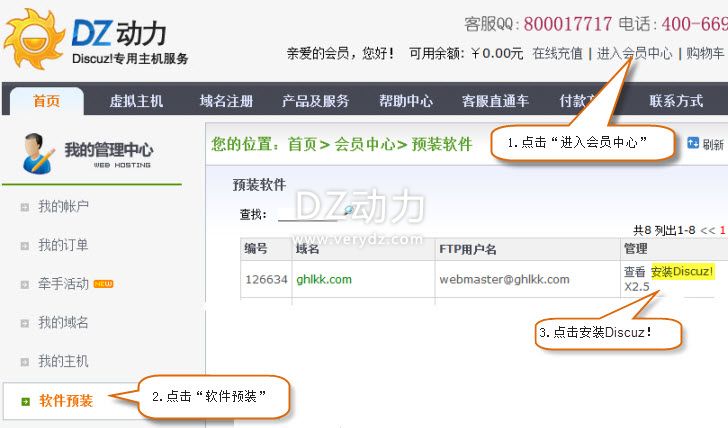
1.登录
http://www.verydz.com/
,点击“进入会员中心 》 软件预装 》 安装Discuz!”;
下载
(49.12 KB)
2012-6-6 15:32
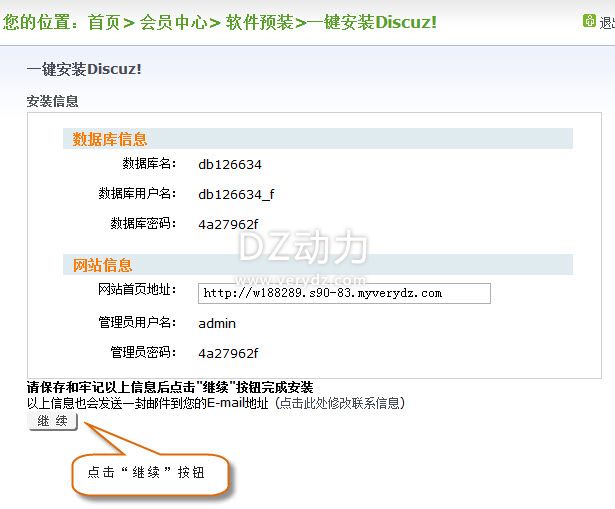
2.点击“继续”按钮;
下载
(41.91 KB)
2012-6-6 15:32
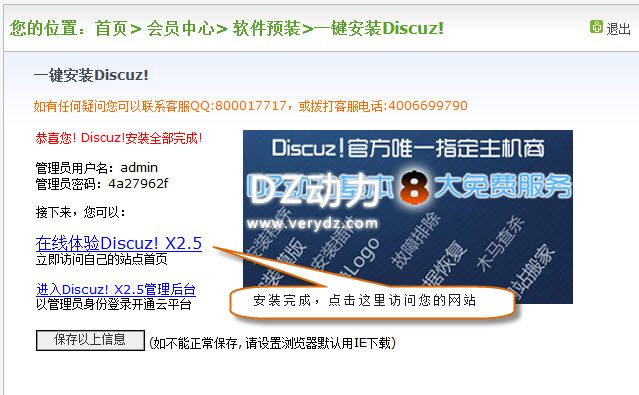
3.安装完成。
下载
(54.59 KB)
2012-6-6 15:32
相关帮助:
如何登陆后台:
http://www.verydz.com/help/thread-862-1-2.html
如何替换LOGO:
http://www.verydz.com/help/thread-159-1-2.html
如何添加备案号:
http://www.verydz.com/help/thread-892-1-2.html
如何设置版块和分区:
http://www.verydz.com/help/thread-883-1-2.html
如何设置版块横排显示:
http://www.verydz.com/help/thread-885-1-2.html
图片附件:
图1.jpg
(2012-6-6 15:32, 49.12 KB) / 下载次数 13255
http://m.verydz.com/help/attachment.php?aid=796&k=84ce4ce457e72d848bb6e9c228359e28&t=1778265553&sid=fJ0VeV
图片附件:
图2.jpg
(2012-6-6 15:32, 41.91 KB) / 下载次数 12114
http://m.verydz.com/help/attachment.php?aid=797&k=b71dd55c7c207ad8803f24ba034f8a51&t=1778265553&sid=fJ0VeV
图片附件:
图3.jpg
(2012-6-6 15:32, 54.59 KB) / 下载次数 12528
http://m.verydz.com/help/attachment.php?aid=798&k=08f136485b5d79e0bb5460eb87f7288f&t=1778265553&sid=fJ0VeV
欢迎光临 帮助中心_DZ动力 (http://m.verydz.com/help/)
Powered by Discuz! 7.2



 图片附件: 图1.jpg (2012-6-6 15:32, 49.12 KB) / 下载次数 13255
 图片附件: 图2.jpg (2012-6-6 15:32, 41.91 KB) / 下载次数 12114
 图片附件: 图3.jpg (2012-6-6 15:32, 54.59 KB) / 下载次数 12528